Docker - 2
Hey there, fellow tech adventurers! 🚀 Welcome to my blog, where I transform complex tech jargon into digestible insights. I’m Yajanth, a passionate explorer of the cloud, DevOps, and software development realms. Here, you’ll find a treasure trove of knowledge—from unraveling the mysteries of containerization to mastering infrastructure as code with Terraform. Join me on this exhilarating journey as we push boundaries, spark creativity, and navigate the ever-evolving tech landscape together. Let’s code, learn, and innovate—one post at a time!
In this article you will learn dockerization process and how to use docker.
There are 3 steps to conatinarize an application:
Create a DockerFile
Build and image using DockerFile
Run the image into a container
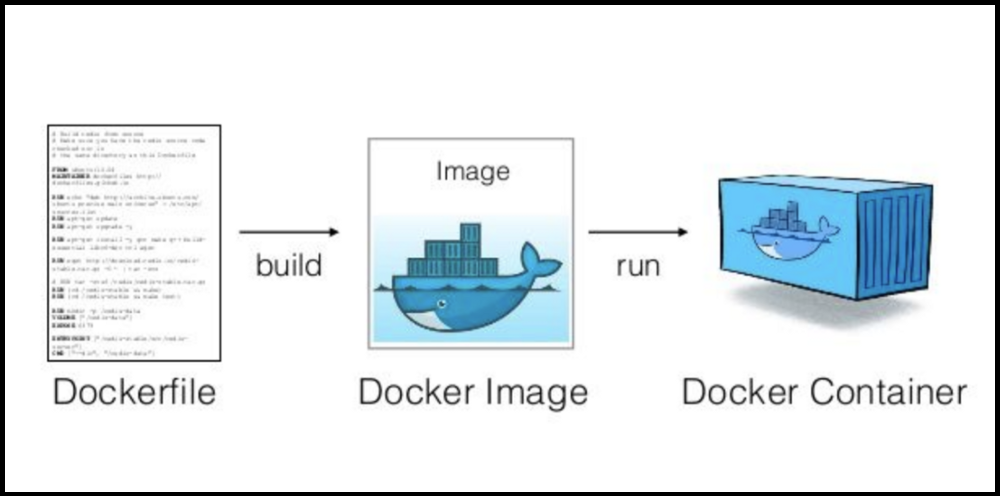
STEP 1: Create a DockerFIile
DockerFile: This is a blueprint of an image. A dockerfile consists of all the instructions to build the image.
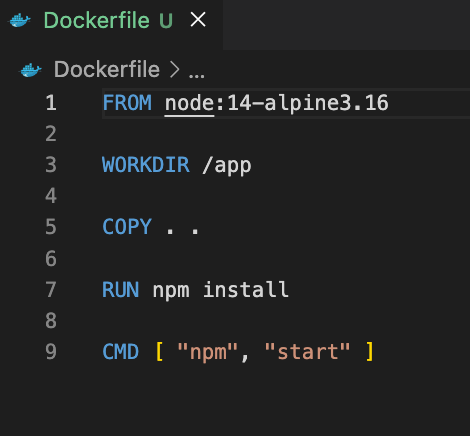
It consists of base image, application code, dependencies, and commands to run the application.
Example:
STEP 2: Build the IMAGE using dockerfile
Image: A lightweight, standalone, and executable package that includes everything needed to run a piece of software, including the code, runtime, libraries, and environment variables.
- Images are used to create containers.
docker build -t <image_name>:<tag> <path_to_dockerfile>
STEP 3: Run the image using Container
Container: Standardized unit of software that packages code and its dependencies, ensuring that applications run quickly and reliably across different computing environments.
docker container run [OPTIONS] IMAGE [COMMAND] [ARG...]
Example: docker run -it ubuntu
The above command runs a ubuntu in a container and enter bash into its terminal(-it <interactive>) .
Basic Docker commands:
Pull an docker image:
docker pull <image_name>Show running containers -
docker psShow all containers:
docker ps -aStop a conatainer -
docker stop <container_name>Show all images-
docker images/docker image lsDelete an image -
docker rmi <name or image_id>Remove unused images -
docker system prunePort mapping -
docker run -p host_port:contontainer_port imag


